
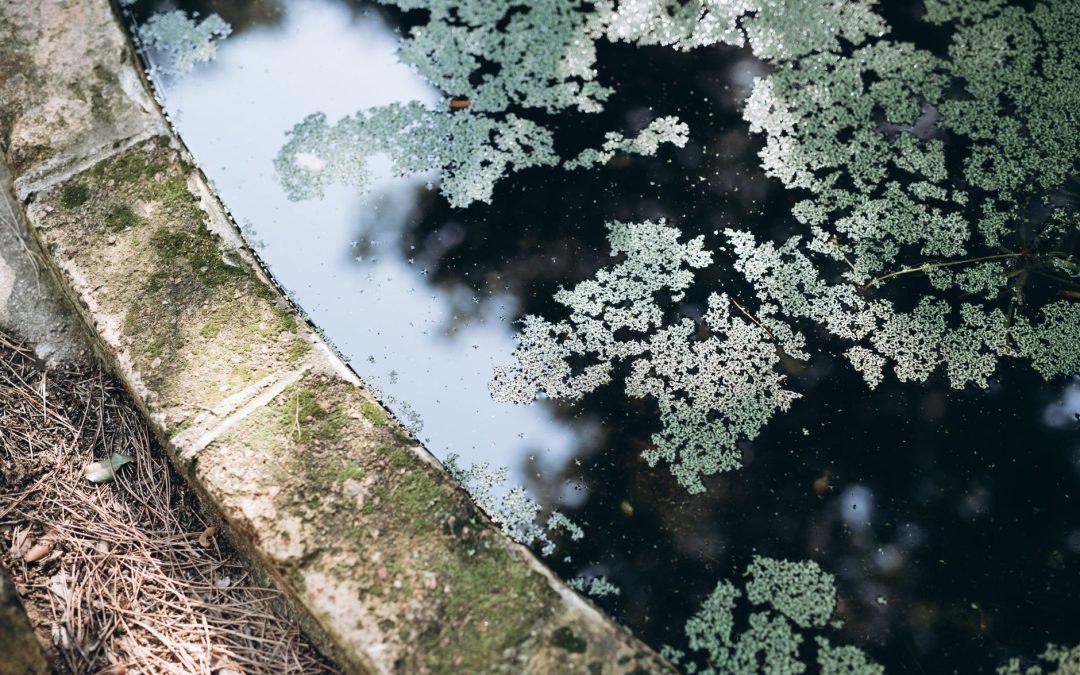
To remove green algae from your pool, you must first balance your water chemistry, then super-chlorinate the water with a process called pool shocking. After the shock treatment, you will need to thoroughly brush the pool surfaces, run the filter continuously for at least 24 hours, and vacuum out the dead algae. This combined chemical and physical approach is necessary to kill the algae and clear your water.
What Causes a Pool to Turn Green in Mesa?
A pool turns green in Mesa primarily due to a lack of effective chlorine, a problem drastically accelerated by our unique local environment. Algae spores are always present, but a bloom occurs when the sanitizer level drops too low to control them. Several factors specific to the Valley of the Sun contribute to this rapid decline.
The most significant factor is the intense Arizona sun. Ultraviolet (UV) rays and high summer temperatures degrade unstabilized chlorine at an astonishing rate, sometimes depleting a pool's sanitizer in just a few hours. This leaves the water vulnerable to an algae takeover.
Our famous monsoon season also plays a major role. Heavy downpours dilute your pool's carefully balanced chemicals, while runoff washes in debris and phosphates. Phosphates are a primary food source for algae, and their introduction can trigger a rapid bloom. Similarly, our dust storms, or haboobs, can dump massive amounts of dust, dirt, and organic matter directly into your pool, overwhelming the filtration and sanitizing systems.
Finally, issues with the pool's equipment can create a perfect environment for algae. Poor circulation from inadequate pump run times or a dirty, clogged filter leads to stagnant water, especially in corners and on steps. When combined with imbalanced water chemistry, particularly high pH, the stage is set. pH is a scale from 0 to 14 that measures how acidic or basic your water is. When the pH rises above 7.8, it dramatically reduces chlorine's effectiveness, meaning you could have chlorine in the water that simply isn't working to kill algae.
A Step-by-Step Guide to Cleaning a Green Pool
Reclaiming a green pool is a systematic process that requires more than just adding a jug of chlorine. Follow these steps carefully to kill the algae, remove it from your water, and restore your pool to its former clarity.
Step 1: Test and Balance Your Water
Before you add a large dose of chlorine, you must prepare the water so the chlorine can work effectively. Use a quality test kit to check your pool's pH and alkalinity levels. Algae often causes pH to rise, which, as mentioned, handcuffs your chlorine.
Your primary goal is to lower the pH to a slightly acidic range of 7.2 to 7.4. Add pH decreaser (muriatic acid or sodium bisulfate) according to the test kit's instructions. Adjusting alkalinity first can help stabilize the pH, but getting the pH right is the most critical pre-shock step.
Step 2: Shock Your Pool with Granular Chlorine
Pool shock is the process of adding a large, concentrated dose of chlorine to the water to break down contaminants and kill algae and bacteria. For a green pool, you need to triple or even quadruple the standard shock dose. For light green water, use about 2-3 pounds of calcium hypochlorite (cal-hypo) shock per 10,000 gallons. For dark green, swamp-like water, use 3-5 pounds per 10,000 gallons.
Always pre-dissolve granular shock in a five-gallon bucket of pool water before adding it to the pool. Broadcasting the granules directly can bleach your pool's surface. With the pump running, pour the dissolved mixture slowly around the perimeter of the pool to ensure even distribution. Perform this step at dusk or overnight, as sunlight will rapidly consume the high levels of chlorine you're adding.
Step 3: Brush All Pool Surfaces
Immediately after shocking the pool, you need to brush every square inch of its surface. Use a stiff pool brush to scrub the walls, steps, ladders, and floor. This physical action breaks apart the algae's protective outer layers and suspends the colonies in the water, allowing the freshly added chlorine to penetrate and kill them.
Pay special attention to areas with poor circulation, like corners, crevices, and behind ladders. Thorough brushing is not a step to be skipped, as it is just as important as the chemical shock.
Step 4: Run the Filter System Continuously
Once the pool is shocked and brushed, turn your filter system on and leave it on. The pump and filter must run 24 hours a day to circulate the chlorinated water and, more importantly, to capture the dead algae particles as they die off.
During this time, the water will likely turn from green to a cloudy, milky blue or gray. This is a good sign, it means the algae is dead and is now suspended in the water, waiting to be filtered out.
Step 5: Clean or Backwash Your Filter
As your filter works overtime to remove the dead algae, it will clog up much faster than usual. You must monitor the filter's pressure gauge. When the pressure reads 8-10 PSI (pounds per square inch) above its clean, starting pressure, it's time to clean it.
For sand and diatomaceous earth (DE) filters, you will need to perform a backwash. This process reverses the flow of water through the filter, flushing the trapped algae and debris out to waste. For cartridge filters, you'll need to remove the cartridges and thoroughly hose them down. You may need to do this multiple times over a few days as the filter collects the dead algae.
Step 6: Vacuum the Dead Algae
After 24-48 hours of filtering, you will see a layer of fine, dead algae settled on the pool floor. The final physical step is to vacuum this debris out. If your filter system has a "waste" or "drain" setting, use it. Vacuuming to waste sends the dead algae directly out of the pool, preventing it from clogging your filter again.
This will cause you to lose some water, so be prepared to top the pool off with a hose. If you cannot vacuum to waste, vacuum slowly to your filter and be prepared to clean it again immediately afterward.
What are the Different Types of Pool Algae?
While green algae is the most common, it's not the only type that can invade your pool. Identifying the algae you're dealing with is key to effective treatment, as some types are much more resilient than others.
| Algae Type | Appearance | Removal Difficulty | Key Treatment Step |
|---|---|---|---|
| Green Algae | Free-floating, slimy green film on surfaces. Causes cloudy green water. | Easiest | Standard shocking and brushing. |
| Yellow Algae | Clings to walls, often in shady spots. Looks like mustard powder or sand. | Moderate | Requires a specific algaecide and aggressive, repeated brushing. Chlorine-resistant. |
| Black Algae | Appears as small, hard black spots with deep roots that penetrate the pool surface. | Most Difficult | Requires a stiff wire brush to break the head and spot-treating with granular chlorine or a specialized algaecide. Often requires professional help. |
How Much Does Professional Algae Removal Cost in Mesa?
Professional green pool algae removal in Mesa, Arizona, typically costs between $250 and $750 in 2026. This price can vary significantly based on several key factors that determine the amount of chemicals, labor, and time required to restore the pool.
The most significant factor is the severity of the algae bloom. A light green pool that was recently clear will be on the lower end of the price range. A pool that is dark green or black, where you cannot see the bottom, is a much more intensive project and will cost considerably more.
Pool size is another critical variable, as larger pools require a greater volume of expensive chemicals like shock and algaecide. The type of algae also impacts the price. A standard green algae treatment is less expensive than a treatment for chlorine-resistant yellow algae or deeply rooted black algae, which both require specialized chemicals and more labor-intensive brushing. In extreme cases, a "drain and clean" or acid wash might be necessary, which can cost $800 or more.
How to Prevent Pool Algae from Coming Back
After you've gone through the work of clearing a green pool, the last thing you want is a repeat performance. Consistent, proactive maintenance is the key to keeping your water clear and algae-free, especially during the Mesa summer.
- Test and Balance Weekly: Test your water at least two to three times per week in the summer. Maintain a free chlorine level between 1-3 parts per million (ppm), pH between 7.4-7.6, and total alkalinity between 80-120 ppm.
- Run Your Pump Daily: Circulation is critical for distributing chemicals and filtering contaminants. Run your filter pump for 8-12 hours every day during the summer months to prevent stagnant water.
- Brush and Skim Regularly: Brush the entire pool surface once a week. This simple five-minute task prevents algae from establishing a foothold on your pool walls and floor.
- Maintain Your Filter: Keep your filter clean according to the manufacturer's instructions. A clean filter is essential for removing microscopic algae spores before they can bloom.
- Shock Your Pool Bi-Weekly: A regular maintenance shock (about 1 pound per 10,000 gallons) every one or two weeks helps eliminate contaminants and prevent algae growth.
- Use a Preventative Algaecide: A weekly dose of a quality algaecide adds an extra layer of protection, working alongside your chlorine to keep algae at bay.
- Manage Water Level: Run your filter pump for 8-12 hours a day in the summer and ensure your water level is correct, as low water from a leak can impair circulation and create dead spots where algae grows.
Frequently Asked Questions
1. Can you swim in a pool with green algae?
No, it is not recommended to swim in a pool with algae. While the algae itself isn't directly harmful, the conditions that allow it to grow also support harmful bacteria like E. coli. A green pool also has dangerously low visibility, making it impossible to see a swimmer in distress on the bottom.
2. How long does it take to clear a green pool?
A mildly green pool can often be cleared in 2-3 days with proper treatment. A severe algae bloom, where the water is dark and opaque, can take a week or more of consistent shocking, filtering, and vacuuming to fully resolve and restore water clarity.
3. Will just shocking my pool kill all the algae?
Shocking is the most critical step for killing algae, but it is not effective on its own. You must also vigorously brush the pool surfaces to break up the algae's protective layers and run your filter continuously to remove the dead particles from the water.
4. Does a saltwater pool prevent algae?
Not automatically. A saltwater pool uses a salt-chlorine generator to produce its own chlorine. If the generator is not running long enough, the cell is dirty, or the water chemistry (like pH or stabilizer) is imbalanced, a saltwater pool can turn green just like a traditional chlorine pool.
5. Why does my pool get algae after a Mesa monsoon storm?
Monsoon storms in Mesa create a perfect storm for algae blooms. The heavy rain dilutes your chlorine and other chemicals, while high winds blow in dust, debris, and algae food like phosphates. This combination of low sanitizer and high nutrients allows algae to multiply rapidly.
Restoring a green pool is a multi-step process that requires diligence and the right chemicals. By following these steps, you can reclaim your clear, sparkling water. However, for severe cases or persistent algae problems, the expertise and powerful equipment of a professional can save you significant time, money, and frustration, ensuring the job is done right the first time.